
ACF Extended Fields & User-Level Restrictions
Plugin demo instructions and functionality described how to use the plugin using each functionality please check ahead for the more scroll it to down.
Documentation
Please see the documentation of the “ACF Extended Fields & User-Level Restrictions” plugin.
Overview
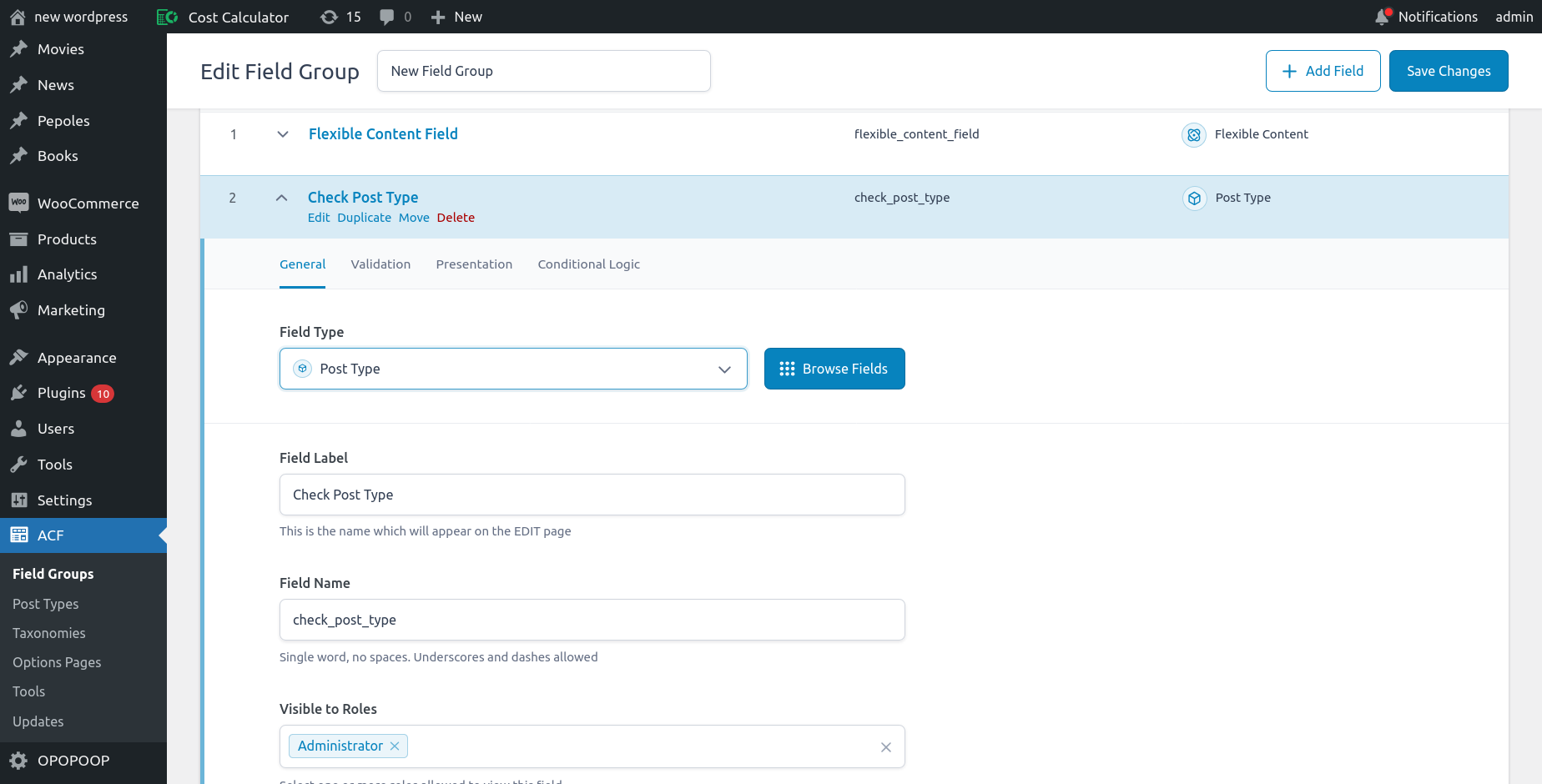
ACF Extended Fields & User-Level Restrictions extends Advanced Custom Fields (ACF) by adding granular visibility options for fields based on user role, user IDs, and user meta values, and introduces a new ACF field type to select a post type.
1. Field Visibility Rules
– Show or hide ACF fields based on WordPress user IDs.
– Show or hide ACF fields based on WordPress user roles.
– Add conditional visibility using user meta values (e.g., department:hr).
– Combine multiple conditions for flexible control.
2. New ACF Field Type – Post Selector
– Provides a custom ACF field type to select a post type.
– Useful for creating relationships.
– Works with any post type (posts or custom post types).
Important Note: ACF Extended Fields & User-Level Restrictions is built on top of the Advanced Custom Fields (ACF) plugin. This plugin requires ACF to be installed and activated in order to function. The plugin allows field visibility restrictions based on User Role, User ID, and User Meta.
Note: The User Meta check does not support arrays, objects, or JSON-formatted meta values. If the stored user meta value is not a simple string or scalar value, the restriction will not work as expected.
Getting Started
Requirements –
To get the best experience with this ACF Extended Fields & User-Level Restrictions plugin, we recommend the following:
PHP 7.4 or later
MySQL 5.6 or later
WordPress 4.5 or later
To be sure about the above requirements, contact your hosting vendor.
Installation & Activation –
This content explains how to install the plugin and get it working.
This plugin can be installed directly from your site.
- Download the ACF Extended Fields & User-Level Restrictions plugin from your account page under the Orders tab.
- Log in to your WordPress admin panel and go to Plugins → Add New.
- Click Upload Plugin, choose the downloaded ZIP file, and click Install Now.
- Once the installation is complete, click the Activate button to enable the plugin.
It can also be installed manually.
- Download the ACF Extended Fields & User-Level Restrictions plugin from your account page under the Orders tab.
- Unzip the package and move it to your plugins directory.
- Login to the WordPress and navigate to the Plugins screen.
- Locate the ACF Extended Fields & User-Level Restrictions in the list and click the Activate link.
Settings
Backend Settings :

Reviews WP Hide Show Featured Image
We hope you enjoy using the ACF Extended Fields & User-Level Restrictions. Please note that we are always trying to improve it.
Add Review
Thanks so much in advance!
FAQs
Ans. No. The plugin works with both free and Pro versions of ACF.
Ans. No. It hides the fields in the WordPress admin (and front-end forms if using ACF Form), but does not restrict the underlying data itself.
Ans. Yes. Field visibility restrictions work with `acf_form()`. However, the validation and visibility checks are only applied when the user is logged in. Guest users will see unrestricted fields by default, preserving ACF’s default behavior.
Ans. Yes, the Post Selector field supports posts and all registered custom post types.